https://quicktype.io/ – Parses sample JSON and creates code to serialize/deserialize it in several different languages.
https://github.com/rspeele/Rezoom.SQL – Rezoom.SQL is an F# ORM for SQL databases using type providers, so it will automatically pick up the schema on build. A HN commenter claimed it has better type support than any other ORM, a statement perhaps to be taken with a grain of salt.
https://github.com/ReactiveX/IxJS – Interactive Extensions for JavaScript (IxJS). IxJS is a set of libraries to compose synchronous and asynchronous collections and Array#extras style composition in JavaScript
Wednesday, December 13, 2017


Wednesday, November 22, 2017
Git line endings revisited and .gitignore
Git-scm.com revised their line ending fix-up instructions in a way that seems to remove ignored files from the repository.
Here are the new instructions:
Here are the new instructions:
echo "* text=auto" >.gitattributes
git read-tree --empty   # Clean index, force re-scan of working directory
git add .
git status              # Show files that will be normalized
git commit -m "Introduce end-of-line normalization"
Wednesday, September 20, 2017
.NET IsAssignableFrom
For some reason I have a mental block remembering which way .NET's
IsAssignableFrom() function works, so, using the excellent LINQPad and the following code snippet, I came up with the following results:typeof(BaseClass).IsAssignableFrom(typeof(DerivedClass)) // truetypeof(DerivedClass).IsAssignableFrom(typeof(BaseClass)) // false
Code:
void Main()
{
 typeof(BaseClass).IsAssignableFrom(typeof(DerivedClass)).Dump("typeof(BaseClass).IsAssignableFrom(typeof(DerivedClass))");
 typeof(DerivedClass).IsAssignableFrom(typeof(BaseClass)).Dump("typeof(DerivedClass).IsAssignableFrom(typeof(BaseClass))");
}

class BaseClass { }
class DerivedClass : BaseClass { }
Thursday, June 08, 2017
C# 6 String Interpolation Does Not Concatenate
Well, I learned something new today that's slightly disappointing. I had thought that C# 6 string interpolation concatenated strings or perhaps used the
Given this source code:
The resulting IL (compiled) code is the following (obtained using LINQPad):
Note the following two statements:
To compile the C# code and create IL code, I used Joe Albahari's excellent LINQPad program.
StringBuilder or some such under the hood. It turns out it merely creates a good, old-fashioned String.Format statement out of it.Given this source code:
The resulting IL (compiled) code is the following (obtained using LINQPad):
Note the following two statements:
ldstr       "A{0}C"
call        System.String.Format
These indicate that String.Format is being called with the familiar-looking format string "A{0}C".To compile the C# code and create IL code, I used Joe Albahari's excellent LINQPad program.
Wednesday, March 29, 2017
WebClient vs HttpClient vs HttpWebRequest
All the clients explained.
http://www.diogonunes.com/blog/webclient-vs-httpclient-vs-httpwebrequest/
To quote from the link:
http://www.diogonunes.com/blog/webclient-vs-httpclient-vs-httpwebrequest/
To quote from the link:
HttpWebRequestfor controlWebClientfor simplicity and brevityRestSharpfor both on non-.NET 4.5 environmentsHttpClientfor both + async features on .NET 4.5 environments
Friday, December 16, 2016
Shallow Copy an array in JavaScript
Who knew?
var copyOfArray = originalArray.slice();Apparently
Array.slice, if called with no parameters, returns a copy of the entire array. Kinda cool!
Wednesday, December 07, 2016
Formatting in ReSharper vs. formatting in Visual Studio
Interesting. Ctrl-K Ctrl-D reformats a file using Visual Studio rules, while Ctrl-Alt-Enter reformats a file using ReSharper rules.
Here's an example, using Visual Studio formatting (Ctrl-K Ctrl-D):
Here's an example, using Visual Studio formatting (Ctrl-K Ctrl-D):
var patient = new Patient { AccountNumber = accountNumber };
And the same code using ReSharper formatting (Ctrl-K Ctrl-F): var patient = new Patient {AccountNumber = accountNumber};
I would have thought that ReSharper would take over the Ctrl-K Ctrl-D and Ctrl-K Ctrl-F keyboard shortcuts, but it does not.
Saturday, November 26, 2016
Testing fonts for ambiguity
This is the string used by Visual Studio's font configuration that indicates whether a font is ambiguous or not for developers:
Tuesday, October 25, 2016
Setting Environment variables in ASP.NET Core
"Turns out environment variables for ASP.NET Core projects can be set without having to set environment variables for user or having to create multiple commands entries....
"This way you do not have to create special users for your pool or create extra commands entries inproject.json. Also, adding special commands for each environment breaks build once, deploy many times' as you will have to calldnu publishseparately for each environment, instead of publish once and deploying resulting artifact many times."
Wednesday, October 12, 2016
Monday, August 29, 2016
Git add non-whitespace changes revisited
There's a better version of what I blogged about here.
Source: http://stackoverflow.com/questions/3515597/add-only-non-whitespace-changes#comment61915463_7149602
Source: http://stackoverflow.com/questions/3515597/add-only-non-whitespace-changes#comment61915463_7149602
Wednesday, August 24, 2016
Visual Studio's most useful (and underused) tips
I discovered Map Mode for the scrollbar. I have seen people use that but always thought it was from a Visual Studio plugin.
Also, who knew you could compare files with Visual Studio?
Navigate to -- Ctrl+, -- is another discovery, as well as moving lines up and down with Alt-Up and Alt-Down.
Visual Studio's most useful (and underused) tips

Also, who knew you could compare files with Visual Studio?
Navigate to -- Ctrl+, -- is another discovery, as well as moving lines up and down with Alt-Up and Alt-Down.
Visual Studio's most useful (and underused) tips
Tuesday, July 05, 2016
GitTfs commands I use every day, round 2
I modified my TfsFetch.sh script to display the name of the current branch. This is to aid in situations where feature branches are being used.
Here's the current script:
Here's the current script:
Tuesday, May 31, 2016
Normalize line endings before removing ignored files
When using the scripts I have blogged about for normalizing line endings and removing ignored files, run the script to normalize line endings first before removing ignored files.
Thursday, May 26, 2016
The old 'TFS Repository can not be root and must start with "$/"' error
When using git-tfs to clone a repository using the bash shell, this error is common:
$ git tfs clone https://tfsserver/tfs/DefaultProjectCollection/ "$/path/to/tfs/project"
TFS repository can not be root and must start with "$/".
You may be able to resolve this problem.
$ MSYS_NO_PATHCONV=1 git tfs clone https://tfsserver/tfs/DefaultProjectCollection/ "$/path/to/tfs/project"
Initialized empty Git repository in C:/Projects/path/to/tfs/project/.git/
Fetching from TFS remote 'default'...
C6782 = 81584efc08348f7dc4c81297e4e82115789a1e3d
C6784 = 6a6a8bd55111286b24c7acd4825e4ef79030d693
C6863 = 60e8369f34b16a6123d7ed22bf60e59db46ee2e9
etc.
Friday, April 15, 2016
TestDisk - Partition Recovery and File Undelete
I wish I'd known about this a few months ago. I accidentally make a disk unbootable, but eventually, after many hours of struggle, I got it working again. This might have save me those many hours.
TestDisk - Partition Recovery and File Undelete
I found this reading the original Server Fault post on the huge data loss allegedly suffered by someone at a British web hosting company.
Linux command line mistake nukes web boss' biz • The Register
centos7 - Recovering from a rm -rf / - Server Fault
TestDisk - Partition Recovery and File Undelete
I found this reading the original Server Fault post on the huge data loss allegedly suffered by someone at a British web hosting company.
Linux command line mistake nukes web boss' biz • The Register
centos7 - Recovering from a rm -rf / - Server Fault
Thursday, March 03, 2016
Cleaning Visual Studio solutions when using Git
Visual Studio has a "Clean Solution" command, of course, but it's conservative in what it cleans and sometimes leaves detritus around that most of the time you want eliminated. It seems to only clean files -- DLL's and PDB's, mostly, but also content configured to be copied to the output folder -- that are created by the current source code and copied references and other files. It also does not eliminate files created at runtime -- for instance error logs -- that your program may have created. One situation in which files are not deleted by the "Clean Solution" or the "Clean Project" command is when you remove an assembly or project reference from a project before you clean it. The removed reference remains in your project's output directory.
Let Git come to the rescue! Assuming that you have a sensible .gitignore file, the following command will delete all bin and obj folders from your project and all subprojects:
Let Git come to the rescue! Assuming that you have a sensible .gitignore file, the following command will delete all bin and obj folders from your project and all subprojects:
Thursday, January 14, 2016
Deleting git index file, a.k.a. more authoritative methods of dealing with Git line ending problems
The classic problem in Windows with line endings in files repeatedly rears its ugly head. I've tried a number of different ways over the years of dealing with them, but I discovered today that the gitattributes documentation actually gives a recipe for dealing with it, which I'll reproduce here:
Meanwhile, the people over at Github have a slightly different approach. (I'm wondering if
The potential problem of the Github approach is that it would add files you might not want in your repository if your repository has any extra stuff in it, i.e. if doing a git status before their procedure shows any files not in the repository.
What's very interesting about the Github approach is that it's very similar to my method for removing all files from a repository that you'd actually like to ignore, except that my steps are missing the git reset --hard command:
One thing I'm not sure of is the difference between
$ echo "* text=auto" >>.gitattributes
$ rm .git/index     # Remove the index to force Git to
$ git reset         # re-scan the working directory
$ git status        # Show files that will be normalized
$ git add -u
$ git add .gitattributes
$ git commit -m "Introduce end-of-line normalization"
Source: http://git-scm.com/docs/gitattributes#_end_of_line_conversion
Meanwhile, the people over at Github have a slightly different approach. (I'm wondering if
rm .git/index followed by git reset is the same as git rm --cached -r.) [EDIT: I realize upon studying this that this version will touch all files in the source tree, whereas the version above does not.]$ echo "* text=auto" >>.gitattributes $ git rm --cached -r . $ git reset --hard $ git add . $ git commit -m "Normalize all the line endings"Source: Refreshing a repository after changing line endings (Github)
The potential problem of the Github approach is that it would add files you might not want in your repository if your repository has any extra stuff in it, i.e. if doing a git status before their procedure shows any files not in the repository.
What's very interesting about the Github approach is that it's very similar to my method for removing all files from a repository that you'd actually like to ignore, except that my steps are missing the git reset --hard command:
$ git rm --cached -r .
$ git add .gitignore
$ git add .
$ git commit -m "Remove ignored files."
git reset vs git reset --hard
One thing I'm not sure of is the difference between git reset and git reset --hard in the Github approach. I'll have to think about that another time. :)
Saturday, January 09, 2016
Five advanced Git merge techniques
Some very interesting stuff here.
I knew about (but forgot) #1 -- including "base" in the merge file output -- but some of the other things are pretty interesting as well.
#4 --
http://blog.ezyang.com/2010/01/advanced-git-merge/
This blog, subtitled "Existential Pontification and Generalized Abstract Digressions," and which I only recently discovered, seems primarily concerned with Haskell but has a huge helping of computer science articles as well. The name of the blog -- "Inside 736-131" -- sounds like the name of a computer science course at MIT. [Edit: now I see that it's apparently Stanford-specific.]
I knew about (but forgot) #1 -- including "base" in the merge file output -- but some of the other things are pretty interesting as well.
#4 --
git merge-file, which redoes the merge -- looks particularly interesting and powerful and helps out in the classic newlines style situations I often find myself in.http://blog.ezyang.com/2010/01/advanced-git-merge/
This blog, subtitled "Existential Pontification and Generalized Abstract Digressions," and which I only recently discovered, seems primarily concerned with Haskell but has a huge helping of computer science articles as well. The name of the blog -- "Inside 736-131" -- sounds like the name of a computer science course at MIT. [Edit: now I see that it's apparently Stanford-specific.]
Tuesday, January 05, 2016
Keeping RDP sessions from locking due to inactivity
YMMV.
Create a VBS file with the following contents:
5/26/16 Edit: here's a better version that does not toggle the ScrollLock key and also increases the delay to minimize disruption:
Create a VBS file with the following contents:
Do
 Set WSHShell = WScript.CreateObject("WScript.Shell")
 WSHShell.SendKeys ("{SCROLLLOCK}")
 Set WSHShell = Nothing
 WScript.Sleep (2*1000)
Loop
Save as a VBS and run on whatever machine you want to stay open.5/26/16 Edit: here's a better version that does not toggle the ScrollLock key and also increases the delay to minimize disruption:
Do
  Set WSHShell = WScript.CreateObject("WScript.Shell")
  WSHShell.SendKeys ("{SCROLLLOCK}{SCROLLLOCK}")
  Set WSHShell = Nothing
  WScript.Sleep (60*1000)
LoopMonday, January 04, 2016
Git: removing cruft from a repository that was added without a .gitignore file
I inherited a Visual Studio project, originally in TFS, where the developer before me added files somewhat willy-nilly to the repository without any sort of filter. Thus, NuGet packages, the bin and obj directories, user settings, and even error logs were committed to version control.
Long story short, I scratched my head over how to clean up the repository such that ignored files were excluded from it. I started picking through by location, file type, and so on, but this took too long, was too tedious, and was likely to miss some files.
Finally, the solution hit me, and it's really quite simple. Here are the steps:
Step 1: remove the entire repository or folder.
[5/26/16 Edit: here are all the lines of code together:
]
Long story short, I scratched my head over how to clean up the repository such that ignored files were excluded from it. I started picking through by location, file type, and so on, but this took too long, was too tedious, and was likely to miss some files.
Finally, the solution hit me, and it's really quite simple. Here are the steps:
Step 1: remove the entire repository or folder.
$ git rm --cached -r .Step 2 (optional): if it wasn't already present, add the .gitignore folder obtained from, e.g. the gitignore project:
$ git add .gitignoreStep 3: add back the folder
$ git add .
Step 4: commit the whole shebang:
$ git commit -m "Remove ignored files."Voila! The resulting commit status (or diff) will show all undesired files being removed.
[5/26/16 Edit: here are all the lines of code together:
]
Tuesday, December 29, 2015
pslist not working – solved
I’m a huge fan of Sysinternals tools, and one of my favorites – pslist – suddenly stopped working one day after a reboot. The error message I received was:
More Googling until I found the following solution:
Processor performance object not found on PC01
Try running Exctrlst from microsoft.com to repair the performance counters.
The
Exctrlst in question is from the Windows Resource Kit. After installing and running the Exctrlst utility, it still didn’t work. Luckily, more Googling led me to running this command:lodctr /rWhich of course didn’t work either. First I got an
error code 5, which I recognized as the old “Access denied” error code, so I ran it again as Administrator. No dice. That just gave me an error code 2.More Googling until I found the following solution:
C:\> cd C:\Windows\SysWOW64
C:\Windows\SysWOW64> lodctr /r
Info: Successfully rebuilt performance counter setting from system backup store
Yay! And finally:
C:\Windows\SysWOW64> winmgmt.exe /RESYNCPERF
C:\Windows\SysWOW64>
A subsequence
pslist worked perfectly.
Tuesday, December 22, 2015
Bootstrap horizontal scrollbar mystery solved
Sometimes when creating a Bootstrap-based site, I've had a pesky problem with a horizontal scrollbar that appears and just won't go away. It turns out the root cause -- and the solution – are simple.
Essentially, make sure any “row” div is inside a “container” div, e.g.:
Essentially, make sure any “row” div is inside a “container” div, e.g.:
Wrong
<div class="row">
    <div class=”col-md-12”>This is some content inside the column</div>
</div>
Right
<div class=”container”>
    <div class="row">
        <div class=”col-md-12”>This is some content inside the column</div>
    </div>
</div>
Saturday, December 05, 2015
How StackOverflow does caching
StackOverflow went down for a few hours earlier today, so I was able to read up on how they do caching here: http://meta.stackexchange.com/questions/69164/does-stack-exchange-use-caching-and-if-so-how
Tuesday, December 01, 2015
Git TFS with Git 2.5 and above - Solved!
I experienced the same issues as the OP here: https://github.com/git-tfs/git-tfs/issues/845
In my case:
This is documented in the release notes here: https://github.com/git-for-windows/build-extra/blob/master/installer/ReleaseNotes.md#known-issues
In my case:
$ git tfs clone https://me.visualstudio.com/DefaultCollection/_versionControl $/MyProject
TFS repository can not be root and must start with "$/".
You may be able to resolve this problem.
- Try using $/C:/Program Files/Git/MyProject
The solution, courtesy of dscho: an msys2 flag that looks like the most bastardized bash syntax in the world, but apparently works. (Is this valid bash or a special msys2 thing?)
$ MSYS_NO_PATHCONV=1 git tfs clone https://me.visualstudio.com/DefaultCollection/ $/MyProject
Initialized empty Git repository in C:/Projects/MyProject/.git/
EDIT:
You can also double up the initial quote after the $, e.g.:$ git tfs clone https://me.visualstudio.com/DefaultCollection/ $//MyProject Initialized empty Git repository in C:/Projects/MyProject/.git/
Tuesday, January 27, 2015
Doug Crockford on Monads and JavaScript
He's not the father of JavaScript, he's more the strongly opinionated caretaker.
Here is his fascinating YouTube video on JavaScript and Monads.
Here is the sourcecode: https://github.com/douglascrockford/monad
He covers four monads in the talk:
Two links he mentions
Here is his fascinating YouTube video on JavaScript and Monads.
Here is the sourcecode: https://github.com/douglascrockford/monad
He covers four monads in the talk:
- The Identity Monad
- The Ajax Monad
- The Maybe Monad, which eliminates the possibility of a null -- very cool!
- The Promise Monad, which apparently is not agreed upon by all to be a monad
Carl Hewitt, inventor of the Actor Model
Mark Miller, Secure Distributed Programming with Object-capabilities in JavaScript
How to Page in ASP.NET Web API
Great article. There are several ways of doing it, including the Twitter way, which handles infinite feeds in real-time scenarios using cursors.
Paging in ASP.NET Web API: Introduction | Jerrie Pelser
Paging in ASP.NET Web API: Introduction | Jerrie Pelser
Cool Visual Studio Extensions From Mads Kristensen
Mads, the author of the essential Web Essentials extension for Visual Studio, has created a number of other plugins and extensions as well. Here's a link to two blog posts by him describing these extensions.
New handy Visual Studio extensions
New handy Visual Studio extensions - part 2
New handy Visual Studio extensions
New handy Visual Studio extensions - part 2
Monday, January 26, 2015
Learn F# or Haskell?
Here's a side-by-side comparison of ML dialects, of which F# is one, with Haskell:
Then there are the various "99 Bottles" F# implementations. Interestingly, Don Syme's is one of the longer version. He is the creator of F# and arguably knows it the best.
Here's the Haskell version:
ML Dialects and Haskell: SML, OCaml, F#, Haskell - Hyperpolyglot
Then there are the various "99 Bottles" F# implementations. Interestingly, Don Syme's is one of the longer version. He is the creator of F# and arguably knows it the best.
99 Bottles of Beer | Language F#
Here's the Haskell version:
99 Bottles of Beer | Language Haskell
Friday, January 23, 2015
ASP.NET - don't minimize files if you're bundling!
If you've got bundling turned on, the ASP.NET bundling library will choose the already minimized instead of minimizing it at runtime. This can cause problems if you have updated the the source file -- file.js or file.css -- and you haven't remimized it.
So don't minimize the file in the IDE. Alternatively, set up some sort of automation that will automatically minimize the file or your minimized CSS and JavaScript files will be out of sync and your won't know why.
See this StackOverflow question: ASP.NET Bundling - Bundle not updating after included file has changed (returns 304 not modified)
So don't minimize the file in the IDE. Alternatively, set up some sort of automation that will automatically minimize the file or your minimized CSS and JavaScript files will be out of sync and your won't know why.
See this StackOverflow question: ASP.NET Bundling - Bundle not updating after included file has changed (returns 304 not modified)
Thursday, January 22, 2015
Adding only non-whitespace changes in Git.
Sometimes it's useful to add only the non-whitespace changes because typically they'll be the meaningful content. This StackOverflow question show how to do that.
Here's the command to add everything, ignoring whitespace-only changes:
Link here: http://stackoverflow.com/questions/3515597/git-add-only-non-whitespace-changes
Here's the command to add everything, ignoring whitespace-only changes:
git diff -w | git apply --cached --ignore-whitespaceLink here: http://stackoverflow.com/questions/3515597/git-add-only-non-whitespace-changes
Wednesday, December 10, 2014
Properly serving SVG files in IISExpress
If you just edit your web.config file it will actually break your website under IISExpress. Instead, follow the instructions found here: http://tomasmcguinness.com/2011/07/06/adding-support-for-svg-to-iis-express/
- Open a console application with administrator privileges.
- Navigation to the IIS Express directory. This lives under Program Files or Program Files (x86)
- Run the command
appcmd set config /section:staticContent /+[fileExtension=’svg’,mimeType=’image/svg+xml’]
Wednesday, November 05, 2014
Git line ending fixups revisited
I blogged about this a few years ago. I discovered how to do this when using
I have a
The sequence of commands is the following:
First, add all changed files: Then, edit the
.gitattributes, which is automatically created when you use Visual Studio to create a project that uses git as its version control system.I have a
.gitattributes file that contains (among other things) this line at the top:The sequence of commands is the following:
First, add all changed files: Then, edit the
.gitattributes file to comment out the "text=auto" line and save this file:
Then issue this command to un-stage all the files. It doesn't matter whether some of the files have meaningful changes. You're not resetting or undoing any file edits, you're merely removing them from the index:
Finally, restore the "text=auto" line in your .gitattributes file and save that file:
You should be all set. If you issue a git status command again you should see only the files that have meaningful changes, if any.
Thursday, October 23, 2014
Friday, September 26, 2014
Beyond SOLID: The Dependency Elimination Principle
http://qualityisspeed.blogspot.com/2014/09/beyond-solid-dependency-elimination.html
Last post I explained why I don't teach the SOLID design principles. Read the post for more detail, but the primary reason is that SOLID encourages heavy use of dependencies. Applying SOLID to a codebase for even a short time will yield dependencies on abstractions everywhere -- quickly producing a codebase that is unintelligible.
Friday, September 05, 2014
git cherry
My mnemonic for git cherry, i.e. git cherry upstream [head]
My quick understanding is that in many cases it means: show me everything that's NOT in upstream.
In other words:
git cherry branch-without-stuff branch-with-stuff
or
git cherry less-stuff more-stuff
or
git cherry present future
or
git cherry past present
So to see what's in develop but not yet in master, type this:
git cherry master develop
Which means, essentially, show me everything in develop that's not (yet) in master.
My quick understanding is that in many cases it means: show me everything that's NOT in upstream.
In other words:
or
git cherry less-stuff more-stuff
or
git cherry present future
or
git cherry past present
So to see what's in develop but not yet in master, type this:
git cherry master develop
Which means, essentially, show me everything in develop that's not (yet) in master.
Wednesday, August 20, 2014
Strongly-typed function callbacks in TypeScript
The question: http://stackoverflow.com/questions/14638990/are-strongly-typed-functions-as-parameters-possible-in-typescript
In TypeScript I can declare a parameter of a function as a type Function. Is there a "type-safe" way of doing this that I am missing?My favorite answer: http://stackoverflow.com/a/24034429/53107 from Drew Noakes:
Here are TypeScript equivalents of some common .NET delegates:interface Action<T> { (item: T): void; } interface Func<T,TResult> { (item: T): TResult; }
Renaming a remote branch in Git
I don't quite understand this, but I'll post it here anyway. It comes from StackOverflow user sschuberth.
Example:
Source: http://stackoverflow.com/a/21302474/53107
git push <remote> <remote>/<old_name>:refs/heads/<new_name> :<old_name>Example:
git push origin origin/hotfix/Cant-load-assembly.0:refs/heads/feature/Fix-cant-load-assembly :hotfix/Cant-load-assembly.0Source: http://stackoverflow.com/a/21302474/53107
Monday, August 18, 2014
Inspecting AngularJS $scope using Firebug and Chrome Developer Tools
The key part:
From: http://blog.alexonasp.net/post/2014/05/27/Inspecting-AngularJS-24scope-using-Firebug-and-Chrome-Developer-Tools.aspx
angular.element($0).scope()
From: http://blog.alexonasp.net/post/2014/05/27/Inspecting-AngularJS-24scope-using-Firebug-and-Chrome-Developer-Tools.aspx
Wednesday, July 30, 2014
Friday, June 20, 2014
Git - Refreshing a repository after changing line endings
Who knew? My repositories sometimes contain problematic commits that are just about fixing up line endings, but here's a solution to that from GitHub. (I haven't tested it yet.)
Refreshing a repository after changing line endingsHere's the StackOverflow post from which GitHub gets their answer. There's also something interesting about removing the index, which I never knew about.
Trying to fix line-endings with git filter-branch, but having no luck
Thursday, April 10, 2014
Use Date Based File Archiving with NLog
My quick and dirty way of doing it. The target tag is the most relevant part if you're already using NLog.
Wednesday, April 09, 2014
My Favorite .NET Code Decorations a.k.a. Attributes
[MethodImpl(MethodImplOptions.Synchronized)]
The method can be executed by only one thread at a time. Locks the instance or, for static methods, the class.[EditorBrowsable(EditorBrowsableState.Never)]
Hides a method from Intellisense.Thursday, March 27, 2014
Migrate away from MSBuild-based NuGet package restore
Very nifty trick. In the end, your solution will look like the following. Note the .nuget folder has only a NuGet.Config file:

Link: http://www.xavierdecoster.com/migrate-away-from-msbuild-based-nuget-package-restore.
Here are the instructions on how to undo it: http://docs.nuget.org/docs/workflows/migrating-to-automatic-package-restore. Note: where the article says "using TFS," read it as "using version control" because the instructions also apply to Git.
Update 4/4/14: You might have to close the solution and delete any .suo files or Visual Studio will stubbornly bring back the .csproj settings that you deleted.
Update 4/9/14: This doesn't appear very stable when using version control features where you backtrack in history -- for instance to merge a feature branch. Visual Studio stubbornly resurrects the import and target tag in the project file, and killing this won't work unless you first close the solution and delete the .suo file.
I'm actually considering moving back to NuGet package restore. At least it's reliable.
Second update 4/9/14: This doesn't play well with ReSharper's cool feature where it automatically adds NuGet packages to a project instead of just a reference.
Link: http://www.xavierdecoster.com/migrate-away-from-msbuild-based-nuget-package-restore.
Here are the instructions on how to undo it: http://docs.nuget.org/docs/workflows/migrating-to-automatic-package-restore. Note: where the article says "using TFS," read it as "using version control" because the instructions also apply to Git.
Update 4/4/14: You might have to close the solution and delete any .suo files or Visual Studio will stubbornly bring back the .csproj settings that you deleted.
Update 4/9/14: This doesn't appear very stable when using version control features where you backtrack in history -- for instance to merge a feature branch. Visual Studio stubbornly resurrects the import and target tag in the project file, and killing this won't work unless you first close the solution and delete the .suo file.
I'm actually considering moving back to NuGet package restore. At least it's reliable.
Second update 4/9/14: This doesn't play well with ReSharper's cool feature where it automatically adds NuGet packages to a project instead of just a reference.
Wednesday, March 05, 2014
Thursday, February 20, 2014
Tuesday, February 18, 2014
How to do a rebase with git gui
Who knew? I thought it wasn't possible, but apparently it is if you modify git config.
http://stackoverflow.com/questions/4830344/how-to-do-a-rebase-with-git-gui
http://stackoverflow.com/questions/4830344/how-to-do-a-rebase-with-git-gui
Add this to the .gitconfig file in your home directory to add rebase commands to the Tools menu:
[guitool "Rebase onto..."]
    cmd = git rebase $REVISION
    revprompt = yes
[guitool "Rebase/Continue"]
    cmd = git rebase --continue
[guitool "Rebase/Skip"]
    cmd = git rebase --skip
[guitool "Rebase/Abort"]
    cmd = git rebase --abort
[guitool "Pull with Rebase"]
    cmd = git pull --rebase
Wednesday, January 29, 2014
AngularJS Dependency Injection Cheatsheet
I finally get it. A cheatsheet for AngularJS dependency injection is as follows:
The core Angular dependencies (those in ng) are not listed in the angular.module() call, but they are listed in the .controller() call and in the function signature.
The 'What_it_provides' name seems to be used by the dependency injection framework in calls to angular.module(), i.e. the provider name, e.g. SomethingService. But the name would just be Something.
The 'Name' name seems to be used in parameter lists of implementation functions and in calls to controller(), factory(), etc.
See the example from the AngularJS tutorial step 11.
var somethingController = angular.module('What_it_provides', ['what', 'it', 'depends', on']);
somethingController.controller('Name', ['$what', '$it', 'depends', 'on', function('$what', '$it', 'depends', 'on') {
// implementation, which returns a value, presumably.
}];
somethingController.controller('Name', ['$what', '$it', 'depends', 'on', function('$what', '$it', 'depends', 'on') {
// implementation, which returns a value, presumably.
}];
The core Angular dependencies (those in ng) are not listed in the angular.module() call, but they are listed in the .controller() call and in the function signature.
The 'What_it_provides' name seems to be used by the dependency injection framework in calls to angular.module(), i.e. the provider name, e.g. SomethingService. But the name would just be Something.
The 'Name' name seems to be used in parameter lists of implementation functions and in calls to controller(), factory(), etc.
See the example from the AngularJS tutorial step 11.
Friday, January 24, 2014
Tuesday, December 03, 2013
Remote Desktop Keyboard Shortcuts
There's some cool stuff in here!
From the article:
From the article:
http://www.mydigitallife.info/keyboard-shortcuts-in-remote-desktop-connection-rdc-for-navigation/
- CTRL+ALT+END: Open the Microsoft Windows NT Security dialog box (CTRL+ALT+DEL)
- ALT+PAGE UP: Switch between programs from left to right (CTRL+PAGE UP)
- ALT+PAGE DOWN: Switch between programs from right to left (CTRL+PAGE DOWN)
- ALT+INSERT: Cycle through the programs in most recently used order (ALT+TAB)
- ALT+HOME: Display the Start menu (CTRL+ESC)
- CTRL+ALT+BREAK: Switch the client computer between a window and a full screen
- ALT+DELETE: Display the Windows menu
- CTRL+ALT+Minus sign (-): Place a snapshot of the entire client window area on the Terminal serverclipboard and provide the same functionality as pressing ALT+PRINT SCREEN on a local computer (ALT+PRT SC)
- CTRL+ALT+Plus sign (+): Place a snapshot of the active window in the client on the Terminal server clipboard and provide the same functionality as pressing PRINT SCREEN on a local computer (PRT SC)
Monday, November 04, 2013
15 Famous Business Books Summarized In One Sentence
Famous Business Book Summaries - Business Insider -- "Want to read 15 famous business books in under a minute?
To save you some time and money, we've made it possible. We boiled down some of the most popular and influential business books out there to their central lessons.
For those looking to bone up on some business theory, here are the highlights."
To save you some time and money, we've made it possible. We boiled down some of the most popular and influential business books out there to their central lessons.
For those looking to bone up on some business theory, here are the highlights."
Monday, July 22, 2013
How to automatically number paragraphs in Word 2007
Finally!
http://www.dummies.com/how-to/content/numbering-headings-in-word-2007-multilevel-lists0.html
The Shauna Kelly site has a 404. At least I think so -- her 404 is so confusing that I'm not even sure I'm looking at a 404. In any case, no instructions are found on her site on how to actually do it.
http://www.dummies.com/how-to/content/numbering-headings-in-word-2007-multilevel-lists0.html
The Shauna Kelly site has a 404. At least I think so -- her 404 is so confusing that I'm not even sure I'm looking at a 404. In any case, no instructions are found on her site on how to actually do it.
Wednesday, February 20, 2013
Tuesday, January 15, 2013
Finding jQuery Event Handlers with Visual Event
This looks incredibly useful: Finding jQuery Event Handlers with Visual Event
Monday, April 02, 2012
10 Value Proposition Examples
Next time someone asks you to write value propositions, you can refer to this page for ideas. 10 Value Proposition Examples:
'via Blog this'
'via Blog this'
Tuesday, March 20, 2012
Using Backbone.js with CoffeeScript | Atomic Spin
Using Backbone.js with CoffeeScript | Atomic Spin - great advice on writing idiomatic CoffeeScript for use with Backbone.js.
Monday, January 09, 2012
Wednesday, November 23, 2011
MVC3 app_code directory
I just found out from K. Scott Allen’s MVC3 training video on Pluralsight that the app_code directory in MVC3 is alive and well. Basically the Razor helpers here are pre-compiled and can be accessed globally in the application.
Apparently the usage in a Razor page is as follows:
@Common.Script(“myscript.js”, Url)

Note to self: compare and contrast with shared “editor” partial views.
Note: I composed this post with Windows Live Writer 2011 but it doesn’t seem to play well with Blogger’s own editor. ¡Qué pena!
Tuesday, October 25, 2011
MVC3 ModelState and overwriting model properties
I will expand this later, I swear.
Caution: when you are using strongly typed models in MVC3 and you modify a property of the model in an Action, that property will get discarded when you create the view unless you clear the ModelState first. When building the view, the model fields are overwritten with values from ModelState, so clearing the ModelState prevents this.
UPDATE 11/10/2011:
This only applies to values passed in via a POST (or a GET?) that you're attempting to override by changing the corresponding fields in the view model.
UPDATE 11/10/2011:
This only applies to values passed in via a POST (or a GET?) that you're attempting to override by changing the corresponding fields in the view model.
Wednesday, October 19, 2011
How To: Reset Identity column in SQL Server
Who knew? How To: Reset Identity column in SQL Server
In a nutshell:
DBCC CHECKIDENT('Company', RESEED, 1)
Thursday, October 13, 2011
RegExes for replacing MVC3 hard-coded hrefs with @Url.Content hrefs
I'm posting this here mainly as a memory aid for myself.
My app is sprinkled with lots of links like this:
I'd like them to look like this, since NuGet seems to be cognizant of such references and apparently changes them on upgrades:
So the following search and replace with RegExes will work:
Include the quotes, and be sure to select "Use regular expressions."
Note that the consistent relative path "../../" must be changed as per your circumstances.
UPDATE on 11/2/11:
This "Replace With" parameter might be better:
"@Href("~\1")"
My app is sprinkled with lots of links like this:
<script src="../../Scripts/jquery-ui-1.8.11.min.js" type="text/javascript"></script>
<script src="@Url.Content("~/Scripts/jquery-ui-1.8.11.min.js")" type="text/javascript"></script>
So the following search and replace with RegExes will work:
| Find what: | "\.\./\.\.{/[^"]*}" |
| Replace with: | "@Url.Content("~\1")" |
Include the quotes, and be sure to select "Use regular expressions."
Note that the consistent relative path "../../" must be changed as per your circumstances.
UPDATE on 11/2/11:
UPDATE on 11/22/11:
Now, according to this article, I see that Url.Content is supposed to be better anyway.
Now, according to this article, I see that Url.Content is supposed to be better anyway.
Tuesday, September 06, 2011
Wednesday, July 13, 2011
WCF Notes
To discover WCF services, make sure that https is turned off. This is done in two places, apparently:
- In the binding, on the Security tab, Mode property, make sure the property is not set to “Transport”.
- In the service behaviors, serviceMetadata, make sure httpsGetEnabled is set to false and that httpsGetEnabled is set to true.
When you’re done, turn those things back on again.
Common Design Patterns Resources : Steve Smith's Blog
Steve Smith gave a great talk last night at Bennett Adelson's .NET SIG, with many good links. Here's the link to his blog post on it: Common Design Patterns Resources : Steve Smith's Blog
Monday, July 11, 2011
Irony - .NET Language Implementation Kit.
Wow. Very interesting stuff here. There are links here on how to implement a DSL. Irony - .NET Language Implementation Kit.
Here is one of the links: Writing your first Domain-Specific Language
Thursday, June 23, 2011
Cleaning up POSTs in ASP.NET MVC | Jimmy Bogard's Blog
Cleaning up POSTs in ASP.NET MVC | Jimmy Bogard's Blog:
"What we see over and over and over again is a similar pattern of:
Where all the things in red are things that change from POST action to POST action."
"What we see over and over and over again is a similar pattern of:
[HttpPost]
public ActionResult Edit(SomeEditModel form)
{
    if (IsNotValid)
    {
        return ShowAView(form);
    }

    DoActualWork();

    return RedirectToSuccessPage();
}
Where all the things in red are things that change from POST action to POST action."
Friday, June 10, 2011
How to replace all automatic properties of string type with a string type which is never null
I have to do this in a piece of code, so I'm recording this here for my future reference.
In Visual Studio's Find and Replace dialog, type the following in the "Find what:" field:
public string \{:i\} \{ get; set; \}
Type this into the "Replace with" field:
private string _\1;\npublic string \1 \{\nget \{ return _\1 ?? ""; \}\nset \{ _\1 = value; \}\n\}
This pattern of performing a test in the getter versus the setter guarantees that it will never be null, and is the pattern used in the TextBox web control's Text property.
Afterwards you'll want to reformat the code, and possibly rename the backing fields, e.g. _FirstName, to be more camel-cased instead of being Pascal-cased(-like), e.g. _firstName instead of _FirstName.
In Visual Studio's Find and Replace dialog, type the following in the "Find what:" field:
public string \{:i\} \{ get; set; \}
Type this into the "Replace with" field:
private string _\1;\npublic string \1 \{\nget \{ return _\1 ?? ""; \}\nset \{ _\1 = value; \}\n\}
This pattern of performing a test in the getter versus the setter guarantees that it will never be null, and is the pattern used in the TextBox web control's Text property.
Afterwards you'll want to reformat the code, and possibly rename the backing fields, e.g. _FirstName, to be more camel-cased instead of being Pascal-cased(-like), e.g. _firstName instead of _FirstName.
Thursday, June 09, 2011
Date & Time Formats on the Web
Everything you've always wanted to know about date/time formats but were afraid to ask.
Date & Time Formats on the Web: "There are several different formats used in different places in the technologies of the World Wide Web to represent dates, times and date/time combinations (hereafter collectively referred to as “datetimes” unless a distinction has to be made). This document presents a survey of the most significant, details which formats are mandated by the key technologies of the web, and offers advice for deciding what formats you should use in your own web applications."
Date & Time Formats on the Web: "There are several different formats used in different places in the technologies of the World Wide Web to represent dates, times and date/time combinations (hereafter collectively referred to as “datetimes” unless a distinction has to be made). This document presents a survey of the most significant, details which formats are mandated by the key technologies of the web, and offers advice for deciding what formats you should use in your own web applications."
Wednesday, May 11, 2011
Josh Reed Schramm - Software Development Thoughts And Opinions - Blog - Unit Testing Role Based Security w/ ASP.Net MVC
When attributes are an integral part of the work flow, testing is a bitch. Luckily I found this code.
Josh Reed Schramm - Software Development Thoughts And Opinions - Blog - Unit Testing Role Based Security w/ ASP.Net MVC: "I took Paul's code and turned it into a series of three controller extension methods which verify if the entire controller requires authorization, a particular method requires authorization or if a particular method requires a given role (i have not yet written the obvious 4th case - an entire controller requires a given role but it should be trivial.)"
Josh Reed Schramm - Software Development Thoughts And Opinions - Blog - Unit Testing Role Based Security w/ ASP.Net MVC: "I took Paul's code and turned it into a series of three controller extension methods which verify if the entire controller requires authorization, a particular method requires authorization or if a particular method requires a given role (i have not yet written the obvious 4th case - an entire controller requires a given role but it should be trivial.)"
Tuesday, May 10, 2011
Compiling MVC Views In A Build Environment
Compiling MVC Views In A Build Environment: "It turns out we had a bug in our project templates in earlier versions of ASP.NET MVC that we fixed in ASP.NET MVC 3 Tools Update.
But if you created your project using an older version of ASP.NET MVC including ASP.NET MVC 3 RTM (the one before the Tools Update), your csproj/vbproj file will still have this bug."
But if you created your project using an older version of ASP.NET MVC including ASP.NET MVC 3 RTM (the one before the Tools Update), your csproj/vbproj file will still have this bug."
Thursday, April 21, 2011
Knock Me Out
Knock Me Out: "Ideas, thoughts, and discussion about Knockout (KnockoutJS.com) and related technologies (jQuery and jQuery Templates)"
Monday, April 18, 2011
Friday, April 08, 2011
Why I Still L.O.V.E. ASP.NET WebForms - John Katsiotis
This guy uses the Model-View-Presenter (MVP) pattern with ASP.NET WebForms. A Microsoft MSDN link is here; a Martin Fowler article here.
Thursday, April 07, 2011
Don't mock HttpContext
Don't mock HttpContext: "It's so easy to take a direct dependency on HttpContext and not even realize it. If you're in the code behind in Web Forms or in a controller action in MVC, it's just right there, tempting you to use it to access session variables, application security, etc.
But don't."
But don't."
Monday, April 04, 2011
dapper-dot-net - Simple SQL object mapper for SQL Server - Google Project Hosting
Wow. Impressive! Great for quick and dirty stuff, no? It uses dynamic types extensively.
dapper-dot-net - Simple SQL object mapper for SQL Server - Google Project Hosting: "Dapper - a simple object mapper for .Net
Dapper is a single file you can drop in to your project that will extend your IDbConnection interface."
dapper-dot-net - Simple SQL object mapper for SQL Server - Google Project Hosting: "Dapper - a simple object mapper for .Net
Dapper is a single file you can drop in to your project that will extend your IDbConnection interface."
Friday, April 01, 2011
Setting the Text of a ListControl in ASP.NET
If you try the following, it should set the visible text of the dropdown control in question, right?
You may be asking yourself why I am trying to set the visible text and not the value of the control. The reason is that the application I'm working on receives the displayed text from a web service and not the value that is passed in the form variables. Why not create a dictionary, look up the the text string in the dictionary, and pass that to the control?
The answer? I already have a dictionary. It's called the SELECT control itself. The generated HTML for my control is, say, the following:
This control is essentially a dictionary of key-value pairs: the key is the value attribute of the option tag, and the value is the visible text that is displayed for the given item in the dropdown list. So in the spirit of Don't Repeat Yourself (DRY), I wrote a extension function to allow me to set not just the value but also the text. I give you ListControlExtensions.cs:
Here's a typical usage. In this particular scenario, my data should be scrubbed, but if not I log a warning:
listControl.Text = "4 Year College";Well, unfortunately, no! The "Text" property is named that way for consistency across all ASP.NET controls and refers to the form value that is passed to the server when the page is submitted. So unfortunately for me, the "Text" property silently rejected my attempt to set it and the page did not work.You may be asking yourself why I am trying to set the visible text and not the value of the control. The reason is that the application I'm working on receives the displayed text from a web service and not the value that is passed in the form variables. Why not create a dictionary, look up the the text string in the dictionary, and pass that to the control?
The answer? I already have a dictionary. It's called the SELECT control itself. The generated HTML for my control is, say, the following:
This control is essentially a dictionary of key-value pairs: the key is the value attribute of the option tag, and the value is the visible text that is displayed for the given item in the dropdown list. So in the spirit of Don't Repeat Yourself (DRY), I wrote a extension function to allow me to set not just the value but also the text. I give you ListControlExtensions.cs:
Here's a typical usage. In this particular scenario, my data should be scrubbed, but if not I log a warning:
Monday, March 28, 2011
Five advanced Git merge techniques : Inside P4
Includes the handy-dandy command: git config --global merge.conflictstyle diff3
by Edward Z. Yang
Have you ever performed a merge in Git and not have it quite turn out the way you wanted it to? For example, you accidentally converted all of your UNIX line endings to DOS line endings, and now the entire file reports a conflict? Maybe you see a conflict that you don't really care about resolving, and want to resolve as theirs? Or perhaps the conflicted file is empty and you can't figure out just what happened there?"
Friday, March 25, 2011
Caffeine-Powered Life - Nested Collection Models in ASP.NET MVC 3
Wow! Caffeine-Powered Life - Nested Collection Models in ASP.NET MVC 3: "We want to create form where I can save information about a person. That person has zero or more phone numbers and zero or more email addresses. The customer would like to edit everything about a person all at once, on a single form. This is a dynamic nested model problem."
Saturday, March 19, 2011
IIS Express FAQ : IIS Express : Microsoft Web Platform : The Official Microsoft IIS Site
After I relocated an IIS express application, it stopped working. Even though I re-registered it with Visual Studio, it appeared "stuck" in its old location. The problem is that Visual Studio doesn't tell you that it hasn't really done anything at all when it claims that it's successfully registered your app after you've moved it. After reading this FAQ I was able to delete the broken site registration and then re-add it in Visual Studio. To fix my problem, I ran "%userprofile%\documents\IISexpress\config" from the Windows start menu, did a ctrl-F to find the application name, and simply deleted the configuration node.
A: Yes, IIS Express uses the same applicationhost.config and web.config files supported by IIS 7.x. The key difference is that with IIS Express, the configuration is maintained on a per-user basis. In particular, whereas IIS has a global “applicationhost.config” file, IIS Express maintains a user-specific “applicationhost.config” file in the %userprofile%\documents\IISexpress\config” folder. This lets a standard user run IIS Express and also lets multiple users work on the same machine independently, without conflicting with each other. Some settings require Administrator user rights to set and modify (see question above about running as a standard user)."
Thursday, March 10, 2011
Tuesday, February 22, 2011
Sunday, February 20, 2011
Reimplementing LINQ to Objects: Part 43 - Out-of-process queries with IQueryable - Jon Skeet: Coding Blog
Reimplementing LINQ to Objects: Part 43 - Out-of-process queries with IQueryable - Jon Skeet: Coding Blog
Interesting stuff throughout, but here's the summary at the end:
"This was really a whistlestop tour of the "other" side of LINQ - and without going into any of the details of the real providers such as LINQ to SQL. However, I hope it's given you enough of a flavour for what's going on to appreciate the general design. Highlights:
- Expression trees are used to capture logic in a data structure which can be examined relatively easily at execution time
- Lambda expressions can be converted into expression trees as well as delegates
- IQueryable
and IQueryable form a sort of parallel interface hierarchy to IEnumerable and IEnumerable - although the queryable forms extend the enumerable forms - IQueryProvider enables one query to be built based on another, or executed immediately where appropriate
- Queryable provides equivalent extension methods to most of the Enumerable LINQ operators, except that it uses IQueryable
sources and expression trees instead of delegates - Queryable doesn't handle the queries itself at all; it simply records what's been called and delegates the real processing to the query provider"
Reimplementing LINQ to Objects: Part 43 - Out-of-process queries with IQueryable - Jon Skeet: Coding Blog
Reimplementing LINQ to Objects: Part 43 - Out-of-process queries with IQueryable - Jon Skeet: Coding Blog
Interesting stuff throughout, but here's the summary at the end:
"This was really a whistlestop tour of the "other" side of LINQ - and without going into any of the details of the real providers such as LINQ to SQL. However, I hope it's given you enough of a flavour for what's going on to appreciate the general design. Highlights:
- Expression trees are used to capture logic in a data structure which can be examined relatively easily at execution time
- Lambda expressions can be converted into expression trees as well as delegates
- IQueryable
and IQueryable form a sort of parallel interface hierarchy to IEnumerable and IEnumerable - although the queryable forms extend the enumerable forms - IQueryProvider enables one query to be built based on another, or executed immediately where appropriate
- Queryable provides equivalent extension methods to most of the Enumerable LINQ operators, except that it uses IQueryable
sources and expression trees instead of delegates - Queryable doesn't handle the queries itself at all; it simply records what's been called and delegates the real processing to the query provider"
Friday, February 18, 2011
Formula for computing how many end users to interview
From http://www.measuringusability.com/blog/customers-observe.php:
We went to a customer's house or workplace and watched them do what they do and recorded their behavior and problems they encountered and how they solved them. Data from follow-me-homes were used for new product ideas and improving existing products. "
"Stalking Customers
When I worked at Intuit (makers of TurboTax, Quicken & QuickBooks) we used a method called "follow-me-home." It was as effective as it was simple in identifying customer problems and needs.We went to a customer's house or workplace and watched them do what they do and recorded their behavior and problems they encountered and how they solved them. Data from follow-me-homes were used for new product ideas and improving existing products. "
Tuesday, February 15, 2011
Scott Hanselman - Creating a NuGet Package in 7 easy steps - Plus using NuGet to integrate ASP.NET MVC 3 into existing Web Forms applications
Scott Hanselman - Creating a NuGet Package in 7 easy steps - Plus using NuGet to integrate ASP.NET MVC 3 into existing Web Forms applications
Also my comment on how to wire up the resultant .csproj file to have the MVC context menus:
Woot! I added the GUID {E53F8FEA-EAE0-44A6-8774-FFD645390401} to the ProjectTypeGuids node of the .csproj, and it's a bone fide MFC project with context menus in the Solution Explorer.
This is the result, with the new GUID underlined:
{E53F8FEA-EAE0-44A6-8774-FFD645390401};{349c5851-65df-11da-9384-00065b846f21};{fae04ec0-301f-11d3-bf4b-00c04f79efbc}
Also my comment on how to wire up the resultant .csproj file to have the MVC context menus:
Woot! I added the GUID {E53F8FEA-EAE0-44A6-8774-FFD645390401} to the ProjectTypeGuids node of the .csproj, and it's a bone fide MFC project with context menus in the Solution Explorer.
This is the result, with the new GUID underlined:
Wednesday, February 09, 2011
The perils of using Func instead of Expression in an IQueryable
This is sort of a LINQ 101 thing, but I haven't had much of an opportunity to use LINQ to SQL yet, believe it or not.
I learned the hard way: when using IQueryable against a database, any predicates handed around should be Expression<func<type, bool>> instead of just Func<type, bool>. Func<type, bool> is evaluated in memory! That means that the entire table is fetched from the database, then filtered in memory. Bad, bad, bad!
I learned the hard way: when using IQueryable against a database, any predicates handed around should be Expression<func<type, bool>> instead of just Func<type, bool>. Func<type, bool> is evaluated in memory! That means that the entire table is fetched from the database, then filtered in memory. Bad, bad, bad!
Friday, February 04, 2011
Video Series: How To Give Great Presentations
Video Series: How To Give Great Presentations: "UGSS (Microsoft's User Group Support Services) have just published a video series that I recorded last year on How To Give Great Presentations. This free series of 8 videos covers the following subjects:-"
Friday, January 21, 2011
Scaffold your ASP.NET MVC 3 project with the MvcScaffolding package « Steve Sanderson’s blog
Very cool. This thing will generated CRUD support, list views, etc.
How To Use Amazon EC2 as Your Desktop - RestBackup™ Blog
How To Use Amazon EC2 as Your Desktop - RestBackup™ Blog: "In this article, I describe how I use EC2 as my Linux development desktop. I provide detailed instructions for every step of the setup process. This guide assumes that your client machine is Windows."
Scott Hanselman - Link Rollup: New Documentation and Tutorials from Web Platform and Tools
Scott Hanselman - Link Rollup: New Documentation and Tutorials from Web Platform and Tools:
"Intro to ASP.NET MVC 3 onboarding series.
Scott Hanselman and Rick Anderson collaboration and Mike Pope (Editor)
Both C# and VB versions:
- Intro to ASP.NET MVC 3
- Adding a Controller
- Adding a View
- Entity Framework Code-First Development
- Accessing your Model's Data from a Controller
- Adding a Create Method and Create View
- Adding Validation to the Model
- Adding a New Field to the Movie Model and Table
- Implementing Edit, Details and Delete
- Source code for this series"
Michael C. Kennedy's Weblog - 11 Killer Open Source Projects I Found with NuGet
Michael C. Kennedy's Weblog - 11 Killer Open Source Projects I Found with NuGet: "11 Killer Open Source Projects I Found with NuGet
Wednesday, January 19, 2011 5:18:17 PM (Pacific Standard Time, UTC-08:00)
So maybe I'm late to the party, but I recently started playing with NuGet. It's a killer new way to find, install, maintain, and manage references to open source libraries in Visual Studio 2010. Plenty of people have written about it (Phil Haack and Scott Hanselman for example). Let's just say you should learn about NuGet if you don't know it already.
What I want to talk about is all the cool open source projects I found just by flipping through the pages of the NuGet directory in the Visual Studio 'Add Library Package Reference' dialog."
Wednesday, January 19, 2011 5:18:17 PM (Pacific Standard Time, UTC-08:00)
So maybe I'm late to the party, but I recently started playing with NuGet. It's a killer new way to find, install, maintain, and manage references to open source libraries in Visual Studio 2010. Plenty of people have written about it (Phil Haack and Scott Hanselman for example). Let's just say you should learn about NuGet if you don't know it already.
What I want to talk about is all the cool open source projects I found just by flipping through the pages of the NuGet directory in the Visual Studio 'Add Library Package Reference' dialog."
Monday, December 27, 2010
Kill That Util Class!
According to him, a static "Helper" or "Util" class is an anti-pattern in a language like C#, which has extension methods, so kill it!
Interesting take. I'd agree that it can greatly reduce the incidence of such classes, yes.
Saturday, December 11, 2010
The protocol-relative URL
From Paul Irish: The protocol-relative URL: "There's this little trick you can get away with that'll save you some headaches:
<img src="//domain.com/img/logo.png">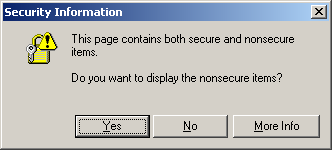 If the browser is viewing that current page in through HTTPS, then it'll request that asset with the HTTPS protocol, otherwise it'll typically* request it with HTTP. This prevents that awful "This Page Contains Both Secure and Non-Secure Items" error message in IE, keeping all your asset requests within the same protocol."
Thursday, December 09, 2010
Algorithmia Source Code released on CodePlex - Frans Bouma's blog
This code library is used by the LLBLGen Pro 3.0 designer, so it's stable and tested.
The undo/redo looks intriguing.
The undo/redo looks intriguing.
Saturday, December 04, 2010
CODE Magazine - Article: Behavior-Driven Development
Uniting XP, Scrum, and BDD.